
| Project ↗ | Documentation ↗ | — | Tutorials ↗ | How To's ↗ | Explanations ↗ | References |
| Entry ↗ | — | Sections ↘ | Permuted Sections ↘ | Names ↘ | Permuted Names ↘ | Strict ↘ | Implementations ↘ |
Documentation -- Reference Pages -- accessor
Table Of Contents
- Roots ↗
Subsections
Operators
- aktive format as d2
- aktive format as markdown
- aktive format as tclscript
- aktive op query colorspace
- aktive query id
- aktive query inputs
- aktive query params
- aktive query setup
- aktive query type
Operators
↑ aktive format as d2
Syntax: aktive format as d2 src [→ definition]
Converts the internal DAG representation of the image into a D2 graph format and returns the resulting string.
Despite the naming the operator is not strict. It does not access the input's pixels at all, only the meta information of the pipeline.
| Input | Description |
|---|---|
| src | Source image |
Examples
| @1
(assets/butterfly.ppm) |
@2
(charcoal) |
aktive format as d2 @2
|
|---|---|---|

geometry(0 0 380 250 3) |

geometry(0 0 380 250 1) |
# -*- d2 -*- direction: left 1: "aktive read from netpbm\n(path tests/assets/butterfly.ppm)" 1.shape: document 1.style.fill: lightgreen 2: "aktive op view\n(port {-1 -1 382 252})" 2.shape: oval 1 -> 2 3: "aktive op tile max\n(radius 1)" 3.shape: oval 2 -> 3 4: "aktive op view\n(port {-1 -1 382 252})" 4.shape: oval 1 -> 4 5: "aktive op tile min\n(radius 1)" 5.shape: oval 4 -> 5 6: "aktive op math sub" 6.shape: oval 3 -> 6 5 -> 6 7: "aktive op math1 invert" 7.shape: oval 6 -> 7 8: "aktive op math1 gamma expand" 8.shape: oval 7 -> 8 9: "aktive op color scRGB to Grey" 9.shape: oval 8 -> 9 10: "aktive op math1 scale\n(factor 0.01)" 10.shape: oval 10.style.fill: orange 9 -> 10 |
↑ aktive format as markdown
Syntax: aktive format as markdown src [→ definition]
Converts the internal DAG representation of the image into a Markdown table and returns the resulting string.
Despite the naming the operator is not strict. It does not access the input's pixels at all, only the meta information of the pipeline.
| Input | Description |
|---|---|
| src | Source image |
Examples
| @1
(assets/butterfly.ppm) |
@2
(charcoal) |
aktive format as markdown @2
|
|---|---|---|

geometry(0 0 380 250 3) |

geometry(0 0 380 250 1) |
||Id|Command|Config|Inputs|Notes| |:---|:---|:---|:---|:---|:---| |FILE|1|aktive read from netpbm|path tests/assets/butterfly.ppm||FO(2): 2, 4| ||2|aktive op view|port {-1 -1 382 252}|1|| ||3|aktive op tile max|radius 1|2|| ||4|aktive op view|port {-1 -1 382 252}|1|| ||5|aktive op tile min|radius 1|4|| ||6|aktive op math sub||3, 5|| ||7|aktive op math1 invert||6|| ||8|aktive op math1 gamma expand||7|| ||9|aktive op color scRGB to Grey||8|| |OUT|10|aktive op math1 scale|factor 0.01|9|| |
↑ aktive format as tclscript
Syntax: aktive format as tclscript src [→ definition]
Converts the internal DAG representation of the image into a Tcl script and returns the resulting string.
Despite the naming the operator is not strict. It does not access the input's pixels at all, only the meta information of the pipeline.
| Input | Description |
|---|---|
| src | Source image |
Examples
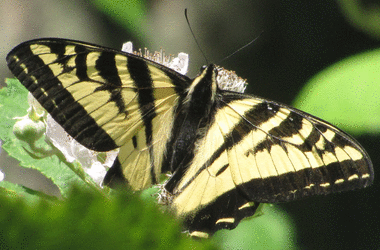
| @1
(assets/butterfly.ppm) |
@2
(charcoal) |
aktive format as tclscript @2
|
|---|---|---|
geometry(0 0 380 250 3) |

geometry(0 0 380 250 1) |
set file1 [aktive read from netpbm path tests/assets/butterfly.ppm] ;# FO(2): tmp2, tmp4 set tmp2 [aktive op view $file1 port {-1 -1 382 252}] set tmp3 [aktive op tile max $tmp2 radius 1] set tmp4 [aktive op view $file1 port {-1 -1 382 252}] set tmp5 [aktive op tile min $tmp4 radius 1] set tmp6 [aktive op math sub $tmp3 $tmp5] set tmp7 [aktive op math1 invert $tmp6] set tmp8 [aktive op math1 gamma expand $tmp7] set tmp9 [aktive op color scRGB to Grey $tmp8] set result [aktive op math1 scale $tmp9 factor 0.01] |
↑ aktive op query colorspace
Syntax: aktive op query colorspace src [→ definition]
Returns the name of the color space the input is in.
If no colorspace is set then sRGB is assumed for 3-band images, and grey for single-band images.
For anything else an error is thrown instead of making assumptions.
| Input | Description |
|---|---|
| src | Source image |
Examples
| @1
|
aktive op query colorspace @1
|
|---|---|

geometry(0 0 256 256 3) |
sRGB |
↑ aktive query id
Syntax: aktive query id src [→ definition]
Returns the input's implementation-specific image identity.
| Input | Description |
|---|---|
| src | Source image |
↑ aktive query inputs
Syntax: aktive query inputs src [→ definition]
Returns a list of the input's inputs.
For an image without inputs the result is the empty list.
| Input | Description |
|---|---|
| src | Source image |
↑ aktive query params
Syntax: aktive query params src [→ definition]
Returns a dictionary containing the input's parameters.
For an image without parameters the result is the empty dictionary.
| Input | Description |
|---|---|
| src | Source image |
Examples
| @1
(zone width 32 height 32) |
aktive query params @1
|
|---|---|

geometry(0 0 32 32 1) |
width 32 height 32 |
| @1
(gradient width 32 height 32 depth 1 first 0 last 1) |
aktive query params @1
|
|---|---|

geometry(0 0 32 32 1) |
width 32 height 32 depth 1 first 0.0 last 1.0 |
↑ aktive query setup
Syntax: aktive query setup src [→ definition]
Returns a dictionary containing the input's setup.
This includes type, geometry, and parameters, if any. The inputs however are excluded.
| Input | Description |
|---|---|
| src | Source image |
Examples
| @1
(zone width 32 height 32) |
aktive query setup @1
|
|---|---|

geometry(0 0 32 32 1) |
type image::zone domain {x 0 y 0 width 32 height 32 depth 1} config {width 32 height 32} |
| @1
|
aktive query setup @1
|
|---|---|

geometry(0 0 32 32 1) |
type image::gradient domain {x 0 y 0 width 32 height 32 depth 1} config {width 32 height 32 depth 1 first 0.0 last 1.0} |
↑ aktive query type
Syntax: aktive query type src [→ definition]
Returns the input's type.
| Input | Description |
|---|---|
| src | Source image |
Examples
| @1
|
aktive query type @1
|
|---|---|

geometry(0 0 32 32 1) |
image::zone |
| @1
|
aktive query type @1
|
|---|---|

geometry(0 0 32 32 1) |
image::gradient |