Using svd2db-rel
- Save your SVD file for your STM32XX mcu in the project root. A STM32F051.svd is provided as an example
- Makefile: change the first line in the Makefile to suit your MCU. Note no file extension is used.:
MCU = stm32f051
- Enter "make" and you should have a new database for your MCU. note the name will be "svd2db-rel.db" which will overwrite any previous database for any other MCU you may have made.
Using the Database
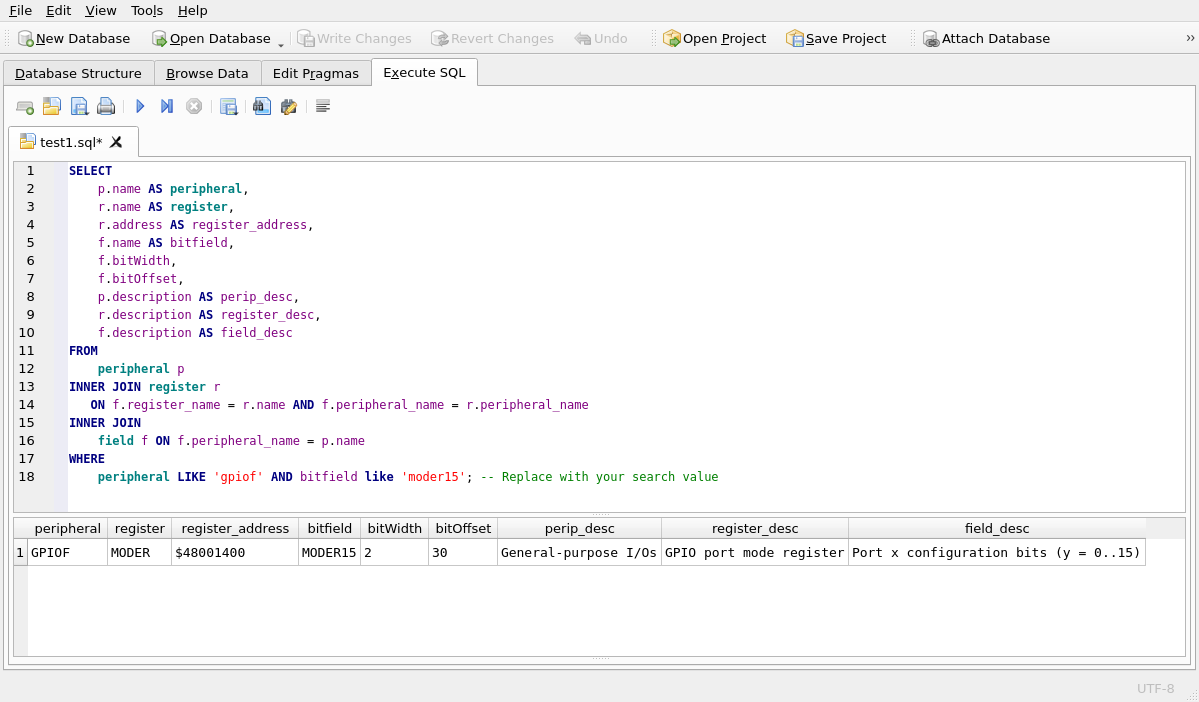
Find for GPIOF-15 (see answers on last line of table below)
- Absolute address of its MODER register
- bitWidth
- bitOffset
SELECT
    p.name AS peripheral,
    r.name AS register,
	r.address AS register_address,
    f.name AS bitfield,
    f.bitWidth,
    f.bitOffset,
    p.description AS perip_desc,
    r.description AS register_desc,
    f.description AS field_desc
FROM
    peripheral p
INNER JOIN register r
   ON f.register_name = r.name AND f.peripheral_name = r.peripheral_name
INNER JOIN
    field f ON f.peripheral_name = p.name
WHERE
    peripheral LIKE 'gpiof' AND bitfield like 'moder15'; -- Replace with your search value
GUI Result: DB Browser for SQLite Version 3.13.1