Day 1 – October 31
Tag: day-1
Our vision for the jam is a text adventure game (along the lines of Zork or Colossal Cave) with integrated audio. We picture background sounds as well as objects in rooms that emit positional 3D audio. We're using Fennel and Love2d.
For the first day, our goal for this day was just to be able to walk around a few connected rooms while sound plays in the background.
The current version of the main game loop
is a function that takes a state table.
The function reads a line of input and parses it as a command,
then hands the parsed command to an execute function that also takes the current state.
The execute function returns a new state table,
and the main loop calls itself in tail recursion.
(local STARTING-STATE
       {:room :BOSKY-DELL
        :running true})

(lambda loop [state]
  (if state.running
    (let [cmd (read-command)
          parsed (parse cmd)]
      (print (fennel.view parsed))
      (tail! (loop (execute state parsed))))))

(loop STARTING-STATE)
However, to accomplish this, we're badly subverting the Love2d loading system.
The main game loop runs in the body of main.fnl (called from main.lua),
which means the entire game is happening before Love2d considers that it has even finished its own initialization.
Our code calls (love.event.quit) immediately,
but the quit event doesn't work its way through the system until after our code in main.fnl has completely finished.
This will likely require some redesign in order to work with the normal
love.update loop, which we may want to use for dynamic audio.
Currently we're not using any features of Love other than love.audio. Our config file conf.lua looks like this, which prevents a graphics window from appearing:
function love.conf(t)
	t.modules.window = false
	t.modules.graphics = false
	t.modules.joystick = false
	t.modules.physics = false
end
Our room definitions are just stored in a table with string identifiers like :BOSKY-DELL for keys.
(local ROOMS
  {:BOSKY-DELL
   {:title "Bosky Dell"
    :long-desc "This is a peaceful forested glade. Yellow sunlight filters through the cool foliage. There is an opening in the branches to the north.\nThere is a mysterious mushroom here."
    :exits {:N :TAR-PIT :S :FETID-SWAMP}
    }

   :TAR-PIT
   {:title "Tar Pit"
    :long-desc "Before you is an odiferous pool of bubbling tar. You can see warm sunlight in an opening to the south."
    :exits {:S :BOSKY-DELL}
    }

   :FETID-SWAMP
   {:title "Fetid Swamp"
    :long-desc "You notice the ground get soft beneath your feet. You appear to have wandered into a swamp. You should have noticed the smell before anything else. Curious."
    :exits {:N :BOSKY-DELL}
    }})
The layout of the dungeon looks like this:
down
box "Tar Pit"
arrow <->
box "Bosky Dell"
arrow <->
box "Fetid Swamp"
→ /pikchrshow
This is a game transcript:
Welcome to Sonic Dungeon (name TBD).
Bosky Dell
This is a peaceful forested glade. Yellow sunlight filters through the cool foliage. There is an opening in the branches to the north.
There is a mysterious mushroom here.
>eat mushroom
"EAT MUSHROOM"
Huh?
Bosky Dell
This is a peaceful forested glade. Yellow sunlight filters through the cool foliage. There is an opening in the branches to the north.
There is a mysterious mushroom here.
>n
"N"
Tar Pit
Before you is an odiferous pool of bubbling tar. You can see warm sunlight in an opening to the south.
>look
"LOOK"
Huh?
Tar Pit
Before you is an odiferous pool of bubbling tar. You can see warm sunlight in an opening to the south.
>s
"S"
Bosky Dell
This is a peaceful forested glade. Yellow sunlight filters through the cool foliage. There is an opening in the branches to the north.
There is a mysterious mushroom here.
>s
"S"
Fetid Swamp
You notice the ground get soft beneath your feet. You appear to have wandered into a swamp. You should have noticed the smell before anything else. Curious.
>quit
"QUIT"
Game Over
We have audio playing now, but it's just a non-interactive looping background track.
There's some confusion with the default output device. On one of our computers, the sound is playing from the desktop speakers, even when other sounds on the computer are playing through the headphones. On another of our computers, sound from the game plays through the headphones as expected.
Fossil
We're using the jam as an opportunity to experiment with Fossil source code management. The basic usage is not that unfamiliar. We're running it with the default autosync mode, which syncs commits to the remote server as soon as they happen (no distinct commit and push as with Git). Fossil has a built-in wiki and ticket tracker that is integrated and version-controlled with the source code. We're using the wiki for brainstorming notes and roadmapping, and for this dev log.
Some surprising things with Fossil:
- When we added a .mp3 file,
fossil commitbugged us about thebinary-globsetting. We set it withfossil settings binary-glob '*.mp3 *.ogg'. But it doesn't seem like that setting gets synced to other users of the repository, rather it's a setting specific to a local repository, or (withfossil settings --global) a local computer. (Later: you can make thebinary-globsetting versioned with a special .fossil-settings/ file.) - It seems like Fossil permanently stores the IP address associated with artifact transfers, which is surprising.
At least, a commit like 4abd6131cd41e7c0 shows the VPN address used to make the commit:
flutter @ 10.7.7.3 on 2025-11-01 01:55:13 (Rcvid 51)
- You can edit past commit messages, as 246df2b2527c7f84 ("fogs"→"frogs"), which is neat. In the command-line
fossil timeline, it shows up like this:02:49:13 [0e367c5733] Edit [246df2b2527c7f84|246df2b252]: Edit check-in comment. (user: flutter)
Day 2 – November 1
Tag: day-2
On this day we refactored the command parser to make it more general and added a player inventory and the ability for rooms to contain items. The game now can handle multi-word commands (like "go north"), and commands that don't consist only of a sequence of fixed strings (like "pick up mushroom"). You can now pick up items, carry them to other rooms, and drop them again.
Lua/Fennel polyglot
We factored out the text I/O main game loop into a separate file, game.fnl.
The idea is to run that blocking stdio in a Love thread
so that it doesn't block Love's loading process and lets us take advantage of things like love.update.
We're thinking of a kind of model–view–controller
paradigm, where the game state (the state table in game.fnl) is the "model",
the I/O loop in game.fnl is the "controller",
and the love code in main.fnl is the "view".
The view manages things that are not technically part of the game state,
but still require managing state, for example fades between different audio effects.
To create a thread, you need to pass a filename to love.thread.newThread. But newThread is expecting Lua code, not Fennel code. If we pass it Fennel code in game.fnl, it will crash with a syntax error.
We first attempted to turn game.fnl into a Lua/Fennel polyglot program. That means the same file can be executed as either Lua code or Fennel code, with the same effect. We used the polyglot recipe from here, which looks like this:
;; return require("fennel").install().eval([==[
(print "Hello Fennel")
;; ]==])
The ;; are Fennel comment markers, which hide the remainder of those lines from Fennel.
The [==[ and ]==] are Lua long literal string delimiters.
When run as Fennel code, the interpreter just executes everything between the first and the last line (which are comments).
When run as Lua code, it loads the fennel module and calls eval on a long literal string which is the Fennel code.
But this polyglot recipe didn't work:
game.fnl:1: unexpected symbol near ';'
stack traceback:
        [love "boot.lua"]:345: in function <[love "boot.lua"]:341>
        [C]: in function 'error'
        [love "callbacks.lua"]:181: in function <[love "callbacks.lua"]:180>
        [love "callbacks.lua"]:154: in function <[love "callbacks.lua"]:144>
        [C]: in function 'xpcall'
The problem is that Lua 5.1 and the LuaJIT that is used by Love
do not permit empty statements,
unlike later versions.
Two semicolons in a row ;; have an empty statement between them.
That's easy to fix, but even with a single semicolon,
there's still an empty statement at the beginning of the file,
which is a Lua syntax error.
A small modification to the polyglot recipe makes it work. Change the double semicolons to single, and insert a statement before the first semicolon that is a no-op in both Lua and Fennel:
tonumber {}; return require("fennel").install().eval([==[
(print "Hello Fennel")
; ]==])
tonumber {} is interpreted by Lua as a functioncall
with a single argument, a table literal.
(No parentheses are required for this special case of function call syntax.)
Fennel, in contrast, interprets tonumber and {} as two distinct expressions,
a function reference and a table literal respectively.
They have no effect when evaluated, as long as there is at least one more
Fennel expression following them to become the return value of the file.
There's one more detail to take care of. We want to pass a Channel to the new thread by providing it as an argument to Thread:start:
(local quit_channel (love.thread.newChannel))
(let [game_thread (love.thread.newThread "game.fnl")]
  (game_thread:start quit_channel)))
Those arguments get passed to the loaded file via its ... expression:
(local quit_channel ...)
In order to make this work, we have to pass ... through
when calling eval
in the Lua interpretation of the polyglot program:
tonumber {}; return require("fennel").install().eval([==[
(print "Hello Fennel")
; ]==], {}, ...)
Phil Hagelberg has another example
of loading an stdio loop with love.thread.newThread.
That one uses
fennel.compileString
to create a FileData
to pass to love.thread.newThread.
(In the end, the polyglot technique is technically not required at all.
For the purposes of love.thread.newThread, the file only has to parse as Lua code, not Fennel.
So a prefix of return require("fennel").install().eval([==[ and a suffix of ]==], {}, ...) would be sufficient.
But it's convenient to be able to, for example, ./fennel-1.6.0 --compile game.fnl
while also having the file be loadable with love.thread.newThread.)
Also, the quit_channel passed into game.fnl turned out not to be needed
for the purpose we were using it for.
You can just call love.event.quit
from the thread.
We didn't know that at first, because the love.event module is not automatically
part of the environment of threads, you have to require it.)
Thinking about object sounds
We have this idea that items should be able to make sound while they are in a room or in your inventory. Also, you should be able faintly to hear sounds that are playing in nearby rooms. We brainstormed some design options.
One option is to use the exits field of room tables
as a hint to what rooms are nearby,
look up the sounds in those rooms,
and play them in the current room.
We might also add a sound-exits or similar,
to enable sound to travel even if there's not an exit the player can take,
for example to make the bell tower audible from various rooms outside.
Another option is not to try to reuse the room topology for sounds, but just to have a handcrafted soundscape in every room. If the room description says "there is a slight whirr of machinery to the east", add that whirr sound (which may be the same whirr sound you would hear if you were to walk east) manually (at a low volume) to the sounds of the current room.
Inventory and objects
We initially had the contents of each room being in a contents field
in the big static ROOMS table.
But in order to make the contents dynamic,
we moved it into a room-contents field of the state table,
to ROOMS can remain read-only.
The parser does some simplistic normalization of inputs.
The parse command will take any of the inputs
"take mushroom", "get mushroom", "pick up mushroom", "get fungus", etc.,
and turn them into a canonical representation
[:TAKE :MUSHROOM].
Bosky Dell
This is a peaceful forested glade. Yellow sunlight filters through the cool foliage. There is an opening in the branches to the north.
There is a mysterious mushroom here.
>acquire mush
[:TAKE :MUSHROOM]
This canonical list representation is returned by the parse function
and consumed centrally by execute.
It would be neat, and we're thinking of a design where,
the different "actors" involved in a command have the opportunity to intervene
in the command's execute.
Zork has a system like this.
For example, drop item could have a default execution
that removes the item from your inventory and adds it to the room contents.
But the item itself could intervene and change how drop works:
like the vase in Colossal Cave, which breaks when you drop it.
Or the current room would get a shot at interpreting the command.
If none of these other layers has anything special to do,
then there would be a default base case execute like our current one.
State representation
We're representing the game state as a state table,
which currently looks like this:
(local STARTING-STATE
       {:room :BOSKY-DELL
        :room-contents {:BOSKY-DELL [:MUSHROOM]}
        :inventory [:PENNY]
        :running true})
The engine uses a kind of functional immutable style, where the execute function
takes a state table as input and produces a new state table as output.
(Rather than mutating global variables.)
This is starting to get cumbersome as the state table grows,
because in each place where the function can return
we have to construct a new state table,
usually with just one or two changed fields and the rest copied from the input state table:
    [:GO bearing nil] {:room (or (. ROOMS state.room :exits bearing) state.room)
                       :room-contents state.room-contents
                       :inventory state.inventory
                       :running state.running}
We're going to want some sort of facility for easily and succinctly creating these modified tables.
Story brainstorming
Win Conditions
Let's subvert the Collector trope!
- Identify all the mushrooms by talking to people, finding snippets of a guidebook, listening to a mushroom identification radio station.
- See all the rooms, the puzzles unlock new rooms until you've seen them all.
- Get to the top of the clock tower. Each puzzle involves going up another level. Clear sense of progression as you go up the tower. I can record a song using a metronome to line up with machinery sounds. Machinery sounds get louder as we go up the tower.
- Unlock all the radio stations, the last station is a number station that tells you the key to the top room of the clock tower.
Player motivations
- It's just cool to see things and solve puzzles!
- Something is broken and you need to fix it
- You're looking for something specific but you can't quite remember what it is or why.
New rooms
We added two new rooms, the Lower Gondola Station and the top of Snowy Mountain. These two aren't just placeholders—we have plans for them in the game.
down
box "Tar Pit"
arrow <->
box "Bosky Dell"
arrow <->
FETID_SWAMP: box "Fetid Swamp"
right
arrow <-> from FETID_SWAMP.e
box "Lower" "Gondola Station" fit
arrow <->
box "Snowy Mountain" fit
→ /pikchrshow
Day 3 – November 2
Tag: day-3
Thinking about game state vs. UI state
Continuing with the model–view–controller thinking,
we moved the state.running variable into a separate mutable variable.
The state.running flag had been used as a signal for the main loop to exit.
The :QUIT execution handler would change it from true to false.
The thinking here is that a running or quit flag is not part of the "game state" as such.
The game state tracks things like the player inventory and the contents of rooms.
Setting a flag to make the program exit is more of a UI concern,
not part of the game logic—even though it is controlled via an in-game command.
(I guess this would be a case of the "controller" (the text I/O loop)
affecting the "view" (the user interface) rather than the "model" (the game state).)
Following this same line of thinking,
when we added a new :DEBUG command
(which controls whether to verbosely display how each command is parsed),
we made the state flag a mutable global variable,
not part of the state table.
The current rule-of-thumb thinking is:
would it make sense to save and restore this variable as part of the game state,
if the game had a save feature?
A running flag doesn't make sense in this light.
A debug-flag arguably does not.
Think of this: if you are playing for a while,
you set the debug flag,
then load an earlier save that did not have the debug flag set,
would you expect the debug flag to be turned off after loading the old file,
or would you expect it to continue to be set?
It seems more natural to make a debug flag a property of the gameplay session
(the view), not of the game itself (the model).
To some extent all this is splitting hairs: it wouldn't get in the way of making the game if we were to handle all these state variables one way or all the other. But that's part of the reason behind doing the game jam, to get exercise thinking about things like this.
Look commands and long room descriptions
We started by printing the current room name and full room description each time the main game loop executed, which meant that the full description was typed after every user input command. Ideally, we'd like to print the long room description only once: when we haven't visited the room before.
We added a list of visited rooms to the game state table,
which is updated each time we visit a room for the first time.
The second and subsequent times you enter a room,
only its short title is shown.
We also added a :LOOK command that prints the long room description again:
>n

Tar Pit
>look

Tar Pit
Before you is an odiferous pool of bubbling tar. You can see warm sunlight in an opening to the south.
The question naturally arises: should the visited table count as part of the game state?
Maybe, when you reload a saved game, you do want the long room descriptions
to be repeated again.
Better not to overthink it!
Brainstorming game objectives
The ideas for a theme and goal for the game are becoming a little more solid. We know we want a clock tower as a central location. Maybe there are puzzles that let you advance up the tower, and the ending is at the top?
Parser
We started work on an LPeg-based command parser to replace our ad-hoc parser, but did not commit anything yet. One unexpected discovery is that LPeg is not a pure Lua module, but compiled C code, which has the potential to complicate distribution of the game, as we'll need to compile the module for every platform.
Fossil repository files
Copying the autumn-lisp-game-jam-2025.fossil to another computer and trying to open it by default tries to autosync with an HTTP remote and username that evidently are embedded in the repository:
$ fossil open ../autumn-lisp-game-jam-2025.fossil
Pull from http://flutter@10.7.7.1/autumn-lisp-game-jam-2025
You can avoid that with --nosync:
$ fossil open --nosync ../autumn-lisp-game-jam-2025.fossil
CREDITS
conf.lua
fennel.lua
game.fnl
main.fnl
main.lua
sounds/21singers.mp3
sounds/BG_FROGS.ogg
project-name: Autumn Lisp Game Jam 2025
repository:   /home/user/autumn-lisp-game-jam-2025.fossil
local-root:   /home/user/autumn-lisp-game-jam-2025/
config-db:    /home/user/.config/fossil.db
project-code: 92908f4c0e79e2247f0727969093109be3e72e51
checkout:     0428a125f53c5c7adb8461c86b7679dbb3bf489e 2025-11-02 16:36:57 UTC
parent:       c5fdddf8ab04375a9ba61a21c8c40e531166008c 2025-11-02 01:01:02 UTC
tags:         trunk
comment:      Move state.running in a global quit variable. (user: flutter)
check-ins:    43
But it shows that something more is needed than just copying the .fossil file when you want to publish your repository. It's not like a Git bundle.
The Fossil quick start page says:
A Fossil repository is a single disk file. Instead of cloning, you can just make a copy of the repository file (for example, using "scp"). Note, however, that the repository file contains auxiliary information above and beyond the versioned files, including some sensitive information such as password hashes and email addresses. If you want to share Fossil repositories directly by copying, consider running the fossil scrub command to remove sensitive information before transmitting the file.
Day 4 – November 3
Tag: day-4
Objective and puzzles
More brainstorming about things to do in the game and puzzles on the way to the end. We are thinking that you want to work your way to the top of the tower, and there are challenges on the way that will require going out and exploring the world.
- A combination lock. A puzzle that needs a string of numbers is a natural way to incorporate one of the oldest ideas we've had for this jam, which is a radio station that only gets reception high up on a mountain.
- Musical combination lock. You need to experience soundscapes in order to learn a melody, rhythm, or dance.
- Communicating with a bird with the help of another bird.
- Find some food to feed a cat.
LPeg command parser
Long before the game jam had started, we thought about implementing a command parser as a parsing expression grammar with LPeg. Treat command interpretation like parsing a formal computer language, with sub-languages defined for things like compass directions and interactable items, which can then be re-used in the parsing of commands that need those components.
The purpose of the command parser is to take a command string,
like "pick up coin",
and convert it into a regular canonicalized form
for further processing, like [:TAKE :PENNY].
We're using sequential Lua tables that contain strings
as the canonicalized form of commands.
Today we [rewrote the command parser with LPeg]. Earlier, the parser had been a hand-rolled one. It split the input string into whitespace-separated words, then used Fennel pattern matching to recognize various synonyms for commands and objects. Actually it was not too bad, as these things go.
(lambda parse-itemid [s]
  (case s
    "MUSHROOM" :MUSHROOM
    "FUNGUS"   :MUSHROOM
    "MUSH"     :MUSHROOM
    "PENNY" :PENNY
    "COIN"  :PENNY))

(lambda parse [?cmd]
  (let [cmd (string.upper (or ?cmd "QUIT")) ;; Treat EOF as if the player typed QUIT.
        words (icollect [w (string.gmatch cmd "%w+")] w)]
    (case words
      (where (or ["N" nil] ["NORTH" nil])) [:GO :N]
      (where (or ["S" nil] ["SOUTH" nil])) [:GO :S]
      (where (or ["E" nil] ["EAST" nil]))  [:GO :E]
      (where (or ["W" nil] ["WEST" nil]))  [:GO :W]
      (where (or ["U" nil] ["UP" nil]))    [:GO :U]
      (where (or ["D" nil] ["DOWN" nil]))  [:GO :D]

      (where (or ["I" nil] ["INVENTORY" nil] ["TAKE" "INVENTORY" nil])) [:INVENTORY]

      (where (or ["L" nil] ["LOOK" nil])) [:LOOK]

      (where (or ["QUIT" nil]
                 ["VAMOOSE" nil]
                 ["SCRAM" nil])) [:QUIT]

      (where (or ["EXAMINE" obj nil]
                 ["X" obj nil]
                 ["LOOK" "AT" obj nil]))
      (case (parse-itemid obj)
        x [:EXAMINE x]
        _ [])

      ;; ...
    )))
(Even though they are all strings,
we're using the convention that double-quoted strings represent
things typed by the player,
and colon-prefixed strings represent canonicalized output of the parser.
And a minor technical point: the reason all the array patterns end with nil
is that pattern matching only checks for equality of a prefix of the value
being matched.
Without the nil, a ["LOOK"] pattern would match both
["LOOK"] and ["LOOK" "AT"].)
The new LPeg-based parser looks like this (omitting some helper
parser combinators, like W which matches complete whitespace-delimited words):
;; Transform a pattern to require consuming the full input, with optional
;; leading and trailing space.
(lambda FULL [cap patt]
  (* (Cc cap)
     (^ Sp 0) ;; Optional leading space.
     patt
     (^ Sp 0) ;; Optional trailing space.
     (P -1))) ;; End of line.

(local Bearing
  (+ (* (Cc :N) (+ (W "n") (W "north")))
     (* (Cc :E) (+ (W "e") (W "east")))
     (* (Cc :S) (+ (W "s") (W "south")))
     (* (Cc :W) (+ (W "w") (W "west")))
     (* (Cc :U) (+ (W "u") (W "up")))
     (* (Cc :D) (+ (W "d") (W "down")))))

(local Item
  (* (OPT Article)
     (+ (* (Cc :MUSHROOM)
           (OPT (W "mysterious"))
           (+ (W "mushroom")
              (W "fungus")
              (W "mush")))

        (* (Cc :PENNY)
           (OPT (W "lucky"))
           (+ (W "penny")
              (W "coin"))))))

(local Command
  (+ (FULL :GO
           (* (OPT (* (+ (W "go")
                         (W "walk"))
                      (OPT (W "to" "the"))))
              Bearing))

     (FULL :INVENTORY
           (+ (W "inventory")
              (W "i")
              (W "take" "inventory")))

     (FULL :LOOK
           (+ (W "look")
              (W "l")))

     (FULL :EXAMINE
           (* (+ (W "examine")
                 (W "x")
                 (W "look" "at"))
              Item))

     ;; ...
  ))

(lambda parse [line]
  ;; Return all captures in a sequential table.
  (lpeg.match (lpeg.Ct Command) (string.lower line)))
The parser has a nice regular structure, and it makes it easier to add variations to commands. Here are some commands that work now that didn't work before:
- walk n
- go to the north
- look at the mysterious mushroom
- pick up the coin
- drop lucky penny
The LPeg parser feature was our first use of a branch in Fossil.
Caveat with unary operators with Fennel and LPeg
There's a surprise with the * and + operators
when used with LPeg patterns in Fennel.
The * operator indicates
concatenation: all patterns given as arguments must match in order.
For example, this is one way to make a pattern that matches the string "ABC":
(* (lpeg.P "A")
   (lpeg.P "B")
   (lpeg.P "C"))
This compiles straightforwardly to the Lua code:
(lpeg.P("A") * lpeg.P("B") * lpeg.P("C"))
Similarly, with two sub-patterns instead of three, it works like you expect.
(* (lpeg.P "A")
   (lpeg.P "B"))
Compiles to:
(lpeg.P("A") * lpeg.P("B"))
The problem arises when there's just one pattern in the concatenation:
(* (lpeg.P "A"))
You would think this would have the same meaning as just (lpeg.P "A").
But actually it compiles to this:
(1 * lpeg.P("A"))
Starting an empty product with 1 makes sense in terms of arithmetic,
but 1, as an LPeg pattern,
means to match 1 of any character.
The Fennel expression (* (lpeg.P "A")) does not result in a pattern
that matches strings beginning with "A",
but one that matches all strings that are at least 2 characters long, and whose second character is "A".
There's an analogous situation with +, the ordered choice operator:
(+ (lpeg.P "A"))
When there's just one option, the compiled Lua adds a 0 to the sum, resulting in a pattern that matches all inputs:
(0 + lpeg.P("A"))
To be safe, you can start your * with an lpeg.P(true)
(the identity element for *)
and your + with an lpeg.P(false)
(the identity element for +),
so that there's always at least two arguments to the call.
LuLPeg
To avoid the issue of having to compile LPeg for distribution, we replaced LPeg with LuLPeg, a port of LPeg to pure Lua. All our parser test cases passed with LuLPeg, needing no other changes.
Unit tests
With the new parser,
we added a file of unit tests.
The tests are run with make test via a makefile:
# Is it possible to use the same LuaJIT that love uses?
LUA = lua
.PHONY: test
test:
        $(LUA) test-parser.fnl
The test program is a Fennel program, but run in a Lua interpreter using the polyglot trick.
Like the comment in the makefile says, this uses the system Lua interpreter. The system Lua interpreter is different from the LuaJIT interpreter that comes with Love2d. Is there a way to run Love's LuaJIT for purposes such as this? How do people normally write unit tests for Love programs?
Fossil web UI HTML titles
The default Fossil web UI constructs HTML titles that put the project name first (in our case "Autumn Lisp Game Jam 2025"):
- Autumn Lisp Game Jam 2025: Timeline
- Autumn Lisp Game Jam 2025: Dev Log
- Autumn Lisp Game Jam 2025: Chat
- Autumn Lisp Game Jam 2025: View Ticket
The problem is, in the browser's tab bar, all of these titles get truncated and become indistinguishable:
- Autumn Lisp Game Jam 202…
- Autumn Lisp Game Jam 202…
- Autumn Lisp Game Jam 202…
- Autumn Lisp Game Jam 202…
We hacked up a custom skin that's the same as the Default skin, but with the project name shifted to the end of the title. Now the tabs are more usable:
- Timeline – Autumn Lisp G…
- Dev Log – Autumn Lisp Ga…
- Chat – Autumn Lisp Game …
- View Ticket – Autumn Lisp …
There's a bit of a trick to modifying the HTML title in the skin
By default, the "header" part of a skin does not contain
the HTML header (where the title is declared);
instead, the HTML header comes from
a default in the Fossil code.
You need to make sure the string <body appears in the template:
this tells Fossil that the template should include everything,
including the HTML header.
We edited the Header template as instructed,
copying the default HTML header before the existing Header template,
and changing
<title>$<project_name>: $<title></title>
to
<title>$<title> – $<project_name></title>:
Header template
<html>
<head>
<meta charset="UTF-8">
<base href="$baseurl/$current_page" />
<meta http-equiv="Content-Security-Policy" content="$default_csp" />
<meta name="viewport" content="width=device-width, initial-scale=1.0">
<title>$<title> – $<project_name></title>
<link rel="alternate" type="application/rss+xml" title="RSS Feed" \
href="$home/timeline.rss" />
<link rel="stylesheet" href="$stylesheet_url" type="text/css" />
</head>
<body class="$current_feature rpage-$requested_page cpage-$canonical_page">
<header>
<div class="logo">
<th1>
## See skins/original/header.txt for commentary; not repeated here.
proc getLogoUrl { baseurl } {
set idx(first) [string first // $baseurl]
if {$idx(first) != -1} {
set idx(first+1) [expr {$idx(first) + 2}]
set idx(nextRange) [string range $baseurl $idx(first+1) end]
set idx(next) [string first / $idx(nextRange)]
if {$idx(next) != -1} {
set idx(next) [expr {$idx(next) + $idx(first+1)}]
set idx(next-1) [expr {$idx(next) - 1}]
set scheme [string range $baseurl 0 $idx(first)]
set host [string range $baseurl $idx(first+1) $idx(next-1)]
if {[string compare $scheme http:/] == 0} {
set scheme http://
} else {
set scheme https://
}
set logourl $scheme$host/
} else {
set logourl $baseurl
}
} else {
set logourl $baseurl
}
return $logourl
}
set logourl [getLogoUrl $baseurl]
</th1>
<a href="$logourl">
<img src="$logo_image_url" border="0" alt="$<project_name>">
</a>
</div>
<div class="title">
<h1>$<project_name></h1>
<span class="page-title">$<title></span>
</div>
<div class="status">
<th1>
if {[info exists login]} {
html "<a href='$home/login'>$login</a>\n"
} else {
html "<a href='$home/login'>Login</a>\n"
}
</th1>
</div>
</header>
<nav class="mainmenu" title="Main Menu">
<th1>
html "<a id='hbbtn' href='$home/sitemap' aria-label='Site Map'>☰</a>"
builtin_request_js hbmenu.js
foreach {name url expr class} $mainmenu {
if {![capexpr $expr]} continue
if {[string match /* $url]} {
if {[string match $url\[/?#\]* /$current_page/]} {
set class "active $class"
}
set url $home$url
}
html "<a href='$url' class='$class'>$name</a>\n"
}
</th1>
</nav>
<nav id="hbdrop" class='hbdrop' title="sitemap"></nav>
<h1 class="page-title">$<title></h1>
Updated state manipulation
- Added a table-patch function that can update part of the state without requiring us to write out all of the fields
- Would be nice to update it to allow us to add missing keys
- It's recursive!
Day 5 – November 4
Tag: day-5
The clocktower
After some brainstorming, we've decided to start the game at the top of the clocktower. As the player progresses out of the tower, they pass a puzzle on each landing that needs to be solved before they can regain access to the belfry. The tower currently has three rooms in it:
down
box "Top of" "Stairwell"
arrow <->
box "Small" "Landing"
arrow <->
box "Base of" "Tower"
→ /pikchrshow
First puzzle: knock and roll
The first complete puzzle implementation presents the player with a closed door, unopenable from the small landing of the tower level. The door has a knocker in the center of it, suggesting what the player should do in order to gain entry. Any initial attempts to coax out the inhabitant with a knock is unfruitful.
Small Landing
The stairs open up to a small landing with a scratchy, well-worn welcome mat and a door with a large brass knocker in its center. A stairwell leads upwards and downwards.
>knock
Good enough for most people, maybe, but not the denizen of this place. You hear no answer.

>knock
Good enough for most people, maybe, but not the denizen of this place. You hear no answer.

>knock
Shave and a haircut is hardly original.

>knock
Good enough for most people, maybe, but not the denizen of this place. You hear no answer.

>knock
You rap out a catchy rhythm with the knocker. Hey you should remember that one! Unfortunately it doesn't prompt movement from the other side of the door. On second thought, you have been in a bit of a creative dry spell lately.
The player must explore and be inspired by the rhythm of the world before returning with knock that will impress enough to reward the user with a completed puzzle.
Small Landing
>knock
You really get into it, using both knuckles, your elbows, the soft rustling of cloth, you lose yourself in your performance. Just as you're about to get carried away and use your head to evoke the sound of a snapping tree branch, the door is flung wide open. "Inspired!" yells the voice from inside and you hear a set of drums start to play, picking up where you left off.
This implementation introduced several new elements to the game:
- a
:KNOCKcommand that allows you to knock on anyKnockableobject - a
:LISTENcommand that is synonymous withwait - our first random selection of multiple possible descriptions of an event (in this case, the basic knock)
- new event state variables for puzzle completion and progression
- variable room descriptions depending on game state (in this case, whether you've solved the knock puzzle and the door is open)
Breaking out modules, main function coroutine
We broke out the static ROOMS, ITEMS, and the new KNOCKABLES definitions
into their own module called dungeon.
Our game has a mix of turn-based and real-time elements. The input/output interaction is turn-based like a traditional text adventure game, but the audio is real-time element because it is always playing. Ideally, we'd like to be able to do things like cross-fade one sound into another, over the course of a second or so, when you pass from one room into another. We want to maintain the style of a blocking turn-based game, while also handing dynamic effects like sound fades using the high-frequency love.update callback.
Our current division of code was going to make this hard to accomplish. What we had was a main.fnl with the love callbacks (love.load, love.update, love.quit), and a game.fnl with all the stdin input and output code, as well as all the game logic. game.fnl was run, not as a normal Fennel module, but as a love Thread, so that it would not block the love2d event loop. We had done a few simple audio tasks in game.fnl, such as changing the volume. But doing anything that has to interact with love.update would be more difficult: we'd need to devise some protocol to send whatever effects we need to happen back to the main thread over a channel.
We arrived at an architecture that lets us continue to write the main game loop as if it were a blocking program, while also letting it run in the same main thread as the love callbacks, for easier integration with the audio engine. The design uses Lua coroutines. These are the files we have now:
- input.fnl. This is the stdin reading code that runs in its own thread from love.thread.newThread. It contains only a small loop that reads lines from stdin, and pushes an
:inputevent to the love event queue for each one. - game.fnl. This file contains the main game loop, which, as before, blocks while waiting for user input and then displays the results of the command. The difference is that the main game loop is now run in a coroutine. The
read-commandfunction, rather than callio.readdirectly, instead callscoroutine.yield. When input.fnl reads a line, a handler for:inputevents causes the coroutine to be resumed with the newly read line. - main.fnl. This file contains just the love callbacks. love.load creates a coroutine for the main game loop function in game.fnl. It sets up an
:inputevent handler that resumes the coroutine whenever the input.fnl thread reads a line and pushes an event.
The main game code runs in the main love2d thread until it needs to read input, then it yields until a line of input is available. We can continue to write that code as if it were blocking on input, while still allowing other code like love.update to run on the main thread.
This redesign was in service of making a portable radio item work. Our plan for this is that the radio should be able to be turned on and off, and be carried between rooms. You need to take the radio to a certain room to get clear reception and get a code that you need to solve a puzzle. It will produce different sounds depending on how close you are to the right spot.
Sounds
We started making an inventory of sounds that we anticipate we'll need.
Day 6 – November 5
Tag: day-6
Today was devoted to two things: implementing the knocking puzzle and making it possible to enter the belfry, and making the radio work.
Knocking puzzle and belfry
We talked about how to make the task of getting into the belfry of the tower fit with the game world. Why does the player character want to get in there, and what is keeping them out?
The idea is that you've accidentally locked yourself out of the belfry, where you live. Your downstairs neighbor has a spare key, but you need to knock on their door in a special way to get them to give it to you. Solving the knocking puzzle gets you a spare key that you can use to unlock and open the trapdoor leading to your home.
Implementing this puzzle required adding an :OPEN verb and a new :BELFRY room,
and additional state to track whether the trap door is open.
Room descriptions can now be conditional on the game state.
Audio "updaters"
While the logic of our game is turn-based, some parts of the UI are real-time, like the audio that dynamically varies as you move from room to room. The rearchitecting of day 5, by letting the stdin/stdout game loop and love's event loop run in concert, made it possible for us to mix these two things.
The main effect we wanted was to smoothly fade audio in and out as things happen in the game, rather than atomically starting and stopping audio sources. We've implemented that with a concept of "updaters", which are functions that game.fnl (the game logic) gives to main.fnl (the love event loop) to call every time love.update is called. We've defined audio source interpolation objects as a kind of updater function, which adjusts the volume of an audio source to make it fade in or fade out on a configurable timescale. The updaters run frequently (about every 1 ms), even while the game logic is waiting on player input.
(lambda love.update [dt]
  ;; Run all the updater functions exported by the game module.
  (each [key update (pairs updaters)]
    (if (not (update dt))
      ;; The update function returned false, indicating that it's no longer
      ;; needed. Remove it from the table.
      (tset updaters key nil))))
We used the updaters to define custom background audio for certain rooms, such as the sound of frogs in the Bosky Dell and clockwork machinery in the upper rooms of the tower. They're also key to making the radio work.
Radio and numbers station
Very early on, in brainstorming ideas for an audio-based adventure game, we had the idea of a portable radio that you have to carry to a remote location in order to receive a special broadcast that solves a puzzle.
There's now a :RADIO item, which is a complex object.
It can be turned on or off, carried in the inventory or stationary in a room,
and the sound it emits changes depending on what room it's in.
In all rooms but one, the radio plays one of two simple looping audio sources. When you're far away from the top of Snowy Mountain, the radio plays static. When you're one room away (at the lower gondola station), the radio reacts and starts making different noises, though still with no intelligible speech. The audio crossfades between these sources if you have the radio turned on as you carry it from one room to another.
At the top of Snowy Mountain, the radio starts receiving a numbers station that is broadcasting a secret 5-digit code, which is generated randomly on startup. The numbers station is more complex that the looping audio sources that play in other rooms. It's a love queueable audio source which plays one audio sample after another. We're using the updaters mechanism to keep the queue filled. Approximately every 1 ms, an updater resumes a coroutine associated with the numbers station audio source. If there's a free buffer, the coroutine queues an audio file for the next digit of the code, or the phrase "message repeats", in an infinite loop.
(love.audio.setEffect "numbers-distortion"
                      {:type "distortion"
                       :gain 0.5})

(local NUMBERS-DIGITS
  (collect [_ n (ipairs [0 1 2 3 4 5 6 7 8 9])]
    (values n (assert (love.sound.newSoundData (string.format "sounds/numbers-%d.ogg" n))))))
(local NUMBERS-REPEATS
  (assert (love.sound.newSoundData "sounds/numbers-repeats.ogg")))

(lambda numbers-updater [source digits]
  (fn wait-and-queue [sound]
    (while (< (source:getFreeBufferCount) 1)
      (coroutine.yield true))
    (source:queue sound)
    (source:play))
  (while true
    (each [_ d (ipairs digits)]
      (wait-and-queue (assert (. NUMBERS-DIGITS d))))
    (wait-and-queue NUMBERS-REPEATS)))

(lambda make-numbers-station [digits]
  (let [source (love.audio.newQueueableSource SAMPLE-RATE BIT-DEPTH CHANNELS 2)
        updater (coroutine.wrap #(numbers-updater source digits))]
    (source:setEffect "numbers-distortion")
    (source:setVolume 0)
    (source:play)
    (values source updater)))
The coroutine style is great for a stateful sequential process like an audio generator. You can write the code almost ignoring the fact that there is a game engine event loop and a stdin/stdout loop happening at the same time.
Every 1 ms is far more frequent than the coroutine really needs to be resumed: almost always, the coroutine resumes only to find that there is no free buffer available, and goes immediately back to sleep. We could make this more efficient by, for example, giving the updaters a hint about what time they should next be called at. But this simple approach is adequate, as long as the program does not use too much CPU.
In that spirit, we're also using a simple approach to managing the background sounds. We load every background source and let them all play, all the time. Most or all of them have their volume set to 0 at any given time, and they are faded up or down individually as called for by the game logic. If the world were large, with many different audio sources, it might become necessary to dynamically load and unload sources instead of playing all of them all the time, but we won't do that if we don't have to.
The radio's secret code isn't hooked into any puzzles yet. We have to figure out how it integrates into the overall story. An obvious solution is that the code opens a combination lock—but what kind of lock makes sense that its combination would be broadcast on a secret radio station?
We have the idea of making it possible to tune the radio to other stations than the numbers station, which will be just for flavor and not part of game progression. But currently there's just the one station.
Day 7 – November 6
Tag: day-7
More expressive room description logic
On day 5 we added a conditional-desc field to each ROOM to give us some flexibility in room descriptions depending on the current game state. The conditional descriptions were a map of keys that corresponded to boolean state variables and an additional string to add to the room description if that state variable evaluates to true. For example, the room description for "Top of Stairwell" before and after solving the puzzle:
Top of Stairwell
You are standing in a circular room. There is a window to your left that looks out onto a small village nestled into rolling hills. There is a mountain in the distance. You appear to be in a tower of some sort, pretty high up. A staircase descends to levels below, winding around the circumference of the tower. There is a ladder here leading up to a trapdoor. You can hear the muffled noise of clockwork.
Top of Stairwell
>unlock trapdoor
You unlock the trapdoor to your apartment with your spare key and throw it open. Natural light spills onto the landing from the belfry.

>look
Top of Stairwell
You are standing in a circular room. There is a window to your left that looks out onto a small village nestled into rolling hills. There is a mountain in the distance. You appear to be in a tower of some sort, pretty high up. A staircase descends to levels below, winding around the circumference of the tower. There is a ladder here leading up to a trapdoor. You can hear the muffled noise of clockwork.
The trapdoor is open and a patch of natural light falls on the floor below it.
This way of doing things is purely additive. To make the room description changes more seamless with the long description of the room, we've removed the conditional-desc field and updated long-desc to be a function that optionally takes the current state and outputs a string. For example, the new long-desc for :TOWER-TRAPDOOR is:
"You are standing in a circular room. There is a window to your "
"left that looks out onto a small village nestled into rolling hills. "
"There is a mountain in the distance. You appear to be in a tower of "
"some sort, pretty high up. A staircase descends to levels below, "
"winding around the circumference of the tower. There is a ladder "
"here leading up to "
(if state.trapdoor-open "an open " "a shut ")
"trapdoor. "
(if state.trapdoor-open
    "A patch of natural light falls on the floor from above. " "")
"You can hear the muffled noise of "
"clockwork. To the right is a cupboard. Its latch is locked with "
"a combination lock."))
Which produces the following before and after puzzle effect:
Top of Stairwell
You are standing in a circular room. There is a window to your left that looks out onto a small village nestled into rolling hills. There is a mountain in the distance. You appear to be in a tower of some sort, pretty high up. A staircase descends to levels below, winding around the circumference of the tower. There is a ladder here leading up to a shut trapdoor. You can hear the muffled noise of clockwork. To the right is a cupboard. Its latch is locked with a combination lock.
Top of Stairwell
>unlock trapdoor
You unlock the trapdoor to your apartment with your spare key and throw it open. Natural light spills onto the landing from the belfry.

>look
Top of Stairwell
You are standing in a circular room. There is a window to your left that looks out onto a small village nestled into rolling hills. There is a mountain in the distance. You appear to be in a tower of some sort, pretty high up. A staircase descends to levels below, winding around the circumference of the tower. There is a ladder here leading up to an open trapdoor. A patch of natural light falls on the floor from above. You can hear the muffled noise of clockwork. To the right is a cupboard. Its latch is locked with a combination lock.
For simple rooms that don't change description, we can simply set long-desc to
#"You are at the base of circular stone tower. A winding stairwell leads up. There is a door leading outside to the south."
Audio recording
One of us took a trip to the recording studio at the Rodolfo "Corky" Gonzales Branch of the Denver Public Library to do the voice acting necessary for the two other radio stations we have planned: the Dusty Rock Room (which consists of nothing but DJ breaks and commercials) and Ear Whacks (which is a DJ introducing wax cylinders, which we're going to get separately from the Internet Archive).
We recorded roughly 30 minutes of audio, 16-bit mono at 44.1 kHz, which comes out to about 150 MB. After selecting the best takes, editing, and compressing to Ogg Vorbis, the audio is 4m09s and 2.4 MB. A dilemma here: do we commit the large raw audio files to the repository? It's good for convenience and for history, but it's not so nice to people who just want to download the repository with the source code.


The other one of us recorded a classical guitar performance to play over the message that will show when you win the game.
Inline images in Fossil wiki
Showing images in a wiki page, as in the subsection above, is kind of weird.
You first have to attach the files using the [attach] link on the wiki editing page.
Upload the files and descriptions, then go to the Misc tab.
There, click "Reload list" to make it notice the new attachments.
Then the attachments will be listed, along with URLs that can be used to link to them from the wiki page.
Attachment 84b8f15407e4f7ca autumn-lisp-game-jam-2025-studio-2.jpg (latest)
attachdownload?page=Dev%20Log&file=autumn-lisp-game-jam-2025-studio-2.jpgraw/da2c87834a77b6a6a1a6a33b75400ac69c0453ecfc5058fbc0a523785967247fAttachment 97e33fb1adb59341 autumn-lisp-game-jam-2025-studio-1.jpg (latest)
attachdownload?page=Dev%20Log&file=autumn-lisp-game-jam-2025-studio-1.jpgraw/92252920fdc671b74c25950f294f8e817fecf4dea5a2d67aa3120fd58cf9979b
Presumably the attachdownload links would keep working if the file were deleted and re-uploaded with the same name,
and the raw links would not?
You can only attach files to a wiki page that already exists. To make a new page that has image attachments, you have to edit and save the page once, then attach, edit, and save again.
There doesn't seem to be a way to edit an attachment description to fix a typo, like the "hime" in autumn-lisp-game-jam-2025-studio-2.jpg.
Day 8 – November 7
Tag: day-8
Polishing
The knocking puzzle plays one of three random knocks when not inspired, with audio and a custom description for each.
Radio puzzle
We added a room containing a locked box, which opens using the secret code from the radio. It makes more sense that a code broadcasted over the radio would open some other lock than your own, something you don't normally have access to.
Radio stations
We implemented two other radio stations, besides the one that gives you the secret code. The Ear Whacks station plays wax cylinder recordings. The Dusty Rock Room plays DJ breaks and commercials.
Both of the other stations are procedurally generated. There are stems for each piece of audio that might be played, and then some little subroutines make random selections and play them in a sensible order (e.g. alternate DJ, song, DJ, song). There are some mild constraints, such as when the DJ back-announces a song, it has to actually match the song that was played most recently.
To implement the procedural audio, we're using a queueable audio Source, just like with the numbers station. This lets us build a sequence of clips dynamically, while still treating it as a single Source. The technique has some downsides, though: it requires loading and decompressing audio files into uncompressed SoundData in memory. Since we have several minutes of audio clips, they actually use up a little bit of memory. It would be possible to build an alternative abstraction, one that uses streaming audio sources for the clips and does not store them uncompressed in memory all the time. But that would require additional adjustments, such as re-applying audio effects on every clip, rather than doing it once and for all on the single queueable Source.
Audio processing to simulate a radio speaker
We wanted to make the radio stations sound more like a portable radio with a weak speaker. That's something you could probably do by preprocessing the audio stems, but we wanted to see what we could do using the features of the love.audio module.
It's a bit hard to figure out how to use the filters and effects in love2d. In Audacity, you can use the Graphic EQ filter and there's even an AM Radio preset. We weren't able to replicate exactly the same effect in love.audio, but we got something that sounds more like a radio than the clean original audio samples. It's using the equalizer effect in combination with a highpass filter.
;; Try and trim low and high frequencies to simulate a radio speaker.
;; This gets combined with an additional highpass filter below.
(love.audio.setEffect "radio-eq"
                      {:type "equalizer"

                       :lowcut 150
                       :lowmidfrequency 400
                       :highmidfrequency 1200
                       :highcut 6000

                       :lowgain 0.126
                       :lowmidgain 1.0
                       :highmidgain 4.0
                       :highgain 0.126

                       :lowmidbandwidth 0.15
                       :highmidbandwidth 1.0})
;; When an effect is set on the source, the original audio without the effect
;; is also played by default. Install a filter to silence the non-effect audio.
(source:setFilter {:type "lowpass" :volume 0})
(source:setEffect "radio-eq" {:type "highpass" :lowgain 0.1})
The LÖVE Audio Effects Playground was a lot of help in figuring out the settings.
Two important and non-obvious points:
- When you set an effect on an audio Source, the processed effect gets played in addition to the original unprocessed audio. It's like a 50/50 wet/dry mix by default.
If you want only the processed audio, you have to silence the original audio.
That's what the
{:type "lowpass" :volume 0}is doing. The important part is the:volume 0; the:type "lowpass"is just there because you must set some type for the filter. This filter doesn't affect the sound that the radio-eq sound sees. - Besides setting a filter on the Source itself,
you can also set an input filter per effect.
This is right there in the documentation,
but we didn't realize it until running the LÖVE Audio Effects Playground and seeing a "pre-filter" for each effect in the UI.
This
{:type "highpass" :lowgain 0.1}removes some low frequencies from the sound before passing through further EQ.
Day 9 – November 8
Tag: day-9
Today we added a win condition (you have to feed the cat) and worked on other polishing and enhancements.
The game now has a title—The Clock Tower—which replaces the development codename Sonic Dungeon.
Win condition
When a player has fed the cat, the game ends. All background sounds fade out and the final song fades in.
The cat is an item that can be carried around like other items. The idea is that you can bring the food to the cat, or you can bring the cat to the food.
Polishing
- Fixed some shortcuts in the puzzle solutions by adding constraints on being in the right room and with the right items.
- Edited room descriptions to match the connections with adjacent rooms.
- Edited text for clarity.
- Added a brief tutorial when starting the program.
- Added a HELP command with general gameplay tips.
- Provided more synonyms and alternative ways of entering commands.
Clock tower bell ringing
We implemented periodic clock tower chimes as background sounds in each of the rooms. This is procedurally generated in a similar way to the radio stations. Each time the bell tolls, it randomly selects from one of four audio files, each of which are a different permutation of four chimes. The tolls are separated by a few minutes of silence. The farther you go from the clock tower, the softer the chimes are.
Windows binaries
Until now we have been running the game with love .
in our source code checkouts.
We added makefile rules to generate the single-file package clocktower.love, as well as a fused Windows executable. This required changing how we load modules to load code modules potentially from inside the .love zip file, rather than always from the filesystem. The purpose of the love.filesystem module had not been clear to us, but now we see what it's for.
Play testing
We made a special version of the game to send to play testers that has built-in logging of game transcripts. The idea is that we can examine the transcripts to see what players try to do, to see when their intentions don't match what the game expects of them, and identify commands that should work but don't.
Fossil
For sharing the Windows binaries with each other, we tried out the Fossil "unversioned content" feature. Because it is not possible to undo a mistake with unversioned content, not even the highest privilege level is able to work with unversioned files by default. You have to grant yourself the "y" permission.
Day 10 – November 9
Tag: day-10
The main activity of the final day was lots of polishing and minor enhancements, guided by feedback from play testing.
Then we submitted the game! You can find it at https://grumblyharmonics.itch.io/clock-tower.
Play testing
We got three friends to play the game as of day-9, using a special version hacked to intercept I/O calls and write a transcript.
The testers gave us some direct feedback, but what we found most useful was reading the transcripts to see what the players wanted to do and what they expected would happen.
The Play Testing wiki page has a summary of things that looked like they should be changed based on play testing. Some highlights:
- Everyone wanted to be able to pet the cat.
- People tried to interact with things that were mentioned in room descriptions but were not real game objects, like the welcome mat in TOWER-KNOCK and the window in TOWER-TRAPDOOR. (Finding a key under a welcome mat is an early puzzle in Maniac Mansion.)
- Entering the unlock code into the box required fairly specific syntax that players had difficulty finding.
- Only one of the random knock responses gave a strong hint that you had to go out to seek inspiration; if you didn't see that one, what to do was unclear.
- Testers tried many alternative ways of phrasing commands,
like
CLIMB LADDERinstead ofUPandPAUSEinstead ofLISTEN. - Some logic bugs, like being able to get infinite keys by knocking more than once.
Polishing
This final phase of polishing, fixing minor bugs, and altering the design to solve problems was a lot of fun!
We added more sounds: cat meows and wind on the mountain peak. (Yes, you can pet the cat now!)
The inventory now shows a list of "special attributes" you have, which include things like being inspired. It also adds a quality-of-life improvement, in that the attributes remember the secret code for you, once you've heard it. This game mechanic is hidden from the player at first. It only appears once you have at least one attribute set.
The game now gives you a score when you quit or win. This is in keeping with this game's being a sort of exercise in implementing classic adventure game tropes. The score mostly tracks things you need to do to win the game, so it can almost be thought of as a progress tracker. However we did add 1 extra point. The way of earning it is an homage to both Witt's End and the Breathtaking View in Adventure.
We made the ENTER CODE and FEED commands more accepting of different syntaxes. In one way this work reduces complexity, by turning special cases into more general cases. But there are also knock-on effects, as you can now ENTER and FEED things that were not originally conceived as being able to handle those verbs. We started to appreciate why the old adventure games had so many default messages, when you can do anything to any pair of items.
The LPeg-based parser was mostly pretty capable at accommodating the syntax changes.
One notable challenge was the command GIVE CAT FOOD.
The intended meaning of the command has CAT-FOOD as the direct object and CAT
as the indirect object; i.e., "give food to cat".
But it's tricky because CAT, FOOD, and CAT FOOD
are all valid item references (because CAT FOOD can be abbreviated FOOD).
The command is parsed instead as having CAT-FOOD
as the indirect object and an empty direct object.
which is a syntax error.
That's because GIVE is a synonym for FEED,
and the parser is interpreting it analogously to FEED CAT.
Where FEED CAT means "feed (an unspecified object) to the cat" and works,
GIVE CAT FOOD means "feed (an unspecified object) to the cat food" and doesn't work.
This bug remains in the submitted version.
We had had the idea of [automatically word-wrapping text] to a reasonable width. We ran out of time to do it automatically, but we did manually wrap long strings in the source code.
Binary packaging
On day 9 we made a Windows executable package, which is what the play testers used. Today we additionally made a macOS .app package and a source zip file. These are automated using a makefile and some shell commands. https://alexjgriffith.itch.io/caph was our model for packaging a Love game.
We know the Windows package works, but we did not test the macOS package at all before the submission deadline.
Public dev log
We wanted to copy this dev log from our private Fossil repository to the public itch dev log. The Fossil wiki is Markdown, but the itch blog uses HTML. We used Pandoc to help with the conversion:
pandoc -f markdown -t html devlog.md -o devlog.html
But the process was not smooth, because itch's HTML editor mangled the markup in various ways. It required a lot of manual fixing.
Our use of internal links in the wiki page was also a problem.
Fossil lets you link to various things like checkins and issues
by their hash, using syntax like [](870e0a8afe600cef).
These links don't have any meaning when copied outside their original context.
We had made limited use of Fossil's embedded pikchr render to make some diagrams. These also needed manual attention to post them on the itch blog. The Fossil web UI pikchrshow path can convert pikchr markup to reusable SVG, at least.
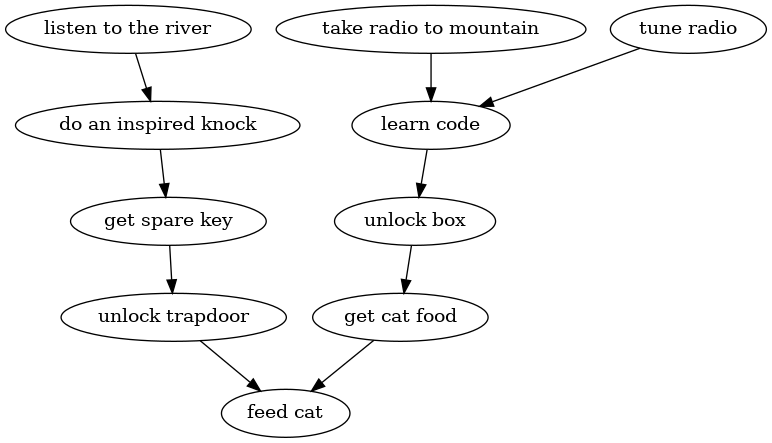
Puzzle dependency chart
Ron Gilbert wrote an interesting article on puzzle dependency charts. This is The Clock Tower's chart:
Fossil
With the frequent commits happening today,
we were feeling the lack of a tool like git log -p,
for which we haven't found a ready replacement yet.
The other feature of Git we use frequently
that Fossil doesn't do as well is committing only a subset
of working directory changes, as with git add -p.
We took to using fossil stash a lot
and storing partial changes in temporary files.
Overall, our experience with Fossil was positive. It's neat to be able to get source code management and all the nice features of a forge, in a form that's pretty easy to set up and doesn't require creating an account somewhere. Besides the issue tracker and the wiki, we used the chat feature a lot as a place for communication just about this project.
What changed
The game we submitted differs somewhat from what we had envisioned at the outset. That's fine—we know, going in, that a game jam would in part be an exercise in being selective and making adjustments in order to meet development constraints.
With the core idea "text adventure plus audio" we originally thought about having 3D x, y, z coordinates for sound sources, with stereo sound cues so that you would be able to sense where objects are in a room. It would extend even to adjacent rooms: if you're facing north, and there's a passage to the east that leads to a room with a river, you would be able to hear the river in your right ear (at a reduced volume) even a room away. You might even be able to face different directions in the same room and hear the sounds coming from different relative directions.
We ended up not having 3D positions of sound sources. Every sound plays with an equal left/right balance. The idea of being able to hear things in nearby rooms survives partially in the clock chimes, which you can hear all over the map, at a volume level according to the proximity to the clock tower.
The original idea also had an element of experimenting with accessibility. When you have a game that integrates and depends on audio to a high degree, what do you for people who cannot hear well? We thought about having a scrolling frequency spectrogram (like the one at music from another room) to give an visual indication of what sounds are currently playing. Actually two spectrograms: one for the left and right channel, the idea being that you could tell which direction a sound was coming from by seeing the same pattern in both spectrograms, but more intense in one or the other.
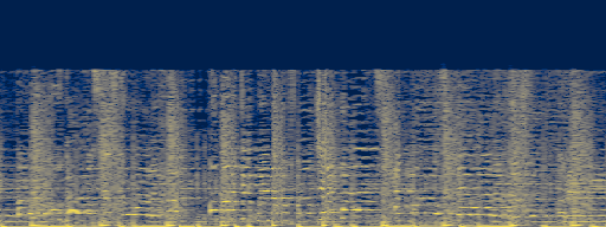
Before the jam started, we asked on the love forum whether it would be possible to get audio samples after processing by the audio engine. In short, no, it doesn't seem like it's easily possible to get the information we would need using the normal love libraries. So we gave up on the spectrogram idea. But if you were making a game in HTML, with easy access to Web Audio and AnalyserNode, it might be a cool thing to try.
Love2d does support setting the 3D position of sound sources. Our not taking advantage of that was more the effect of time constraints and lacking a clear vision of how it should work.
The game as submitted does some mixing of turn-based and real-time mechanisms. The commands and game state updates are turn-based, but the audio effects are real time: the radio stations keep playing all the time, and there are things like gradual fades between sounds as you move between rooms. One idea which we did not realize is making the real-time sounds extend more into the turn-based command interface. While you are composing your command in the bottom line of the screen, the sounds that are playing get shown in a scrolling transcript above that:
Town Square
You are in a town square with cobblestones below your feet.
There are exits to the north and east. A wheelbarrow leans
against a tree.
* "—boards today! Bill builds 'em, you buy 'em." (radio)
>look at wheelbarrow
You see nothing special about the wheelbarrow.
* Bong (the bell rings).
* A dog barks.
* "Cheep!" says a bird.
* Bong. Bong.
>play the magic flute
Doing this would be a lot of work: besides whatever terminal-fu is needed to make the scrolling work, you would need timed transcripts for all the audio files. But it would be another neat experiment in accessibility, and it would have the effect of reinforcing the noise or lack thereof in a given scene, as places with lots of sounds playing would have faster scrolling text.
Day 11 – November 10
macOS packages
We got feedback that the untested macOS packages we submitted don't work. Apparently, the app icon just bounces and becomes unresponsive before anything happens. It's probably because the game requires a terminal for its input and output, and the packaged executable doesn't automatically open a terminal. For the Windows package, we used lovec.exe instead of love.exe to make a console show up.
According to the love getting started guide,
it should be possible to run the love interpreter directly from inside love.app,
passing it clocktower.love:
/Applications/love.app/Contents/MacOS/love ~/path/to/clocktower.love
But we haven't found that to work yet.
Attachments:
- anotherroom-spectrogram.png [download] added by flutter on 2025-11-10 07:13:50. [details]
- puzzle-dependency.png [download] added by flutter on 2025-11-10 06:56:14. [details]
- autumn-lisp-game-jam-2025-studio-2.jpg [download] added by flutter on 2025-11-07 04:00:36. [details]
- autumn-lisp-game-jam-2025-studio-1.jpg [download] added by flutter on 2025-11-07 03:59:07. [details]